15 Command Center Ideas That Actually Work for Busy Families
The school permission slip is somewhere. The dentist appointment card? Maybe in your purse. Your partner’s work schedule? Good question. And that grocery list you started three days ago has vanished into thin air.
Sound familiar?
If your family’s information lives in scattered notes, random papers on the counter, and half-forgotten text messages, you’re not alone—and you’re not failing. You just need a family command center.
A command center is your household’s central hub—one designated spot where schedules, important papers, meal plans, and to-do lists live. It’s the difference between frantically searching for the soccer schedule at 7 AM and calmly checking one location where everything is organized and visible.
But here’s the truth: not all command centers work for real families. Pinterest is full of gorgeous setups that require perfect handwriting, daily maintenance, and kids who never touch anything. That’s not reality.
In this guide, I’m sharing 15 home organization ideas for command centers that actually function in busy households with working parents, active kids, and limited time. These aren’t just pretty—they’re practical, sustainable, and designed for families who need systems that work even during the chaos.
Let’s build a command center that finally brings order to your family’s schedule.
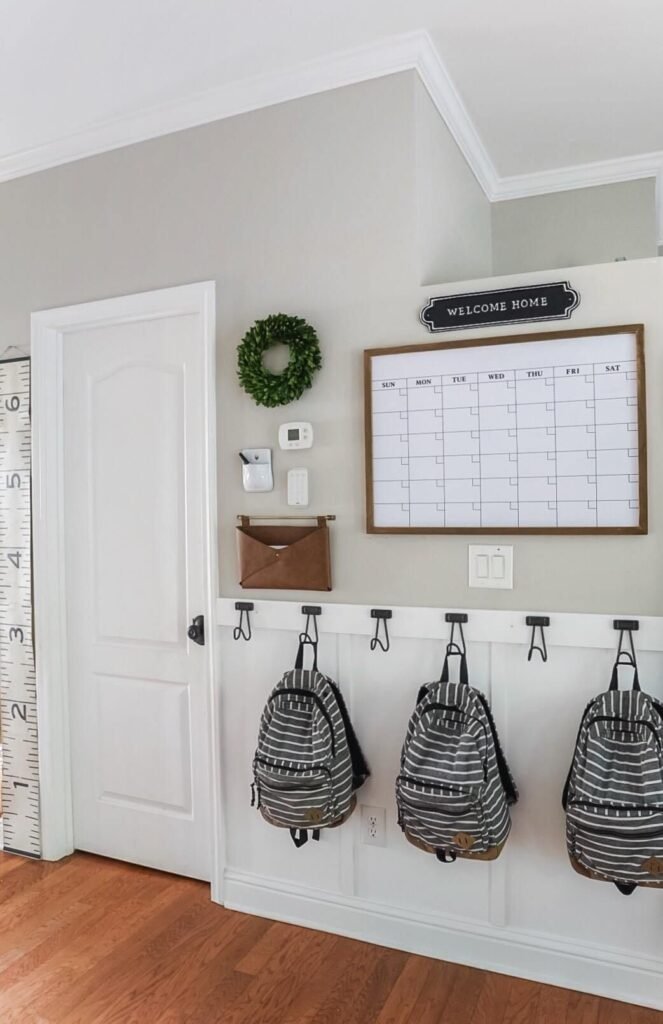
What Makes a Command Center Actually Work?
Before we dive into specific ideas, let’s establish what separates functional command centers from Pinterest failures.
The Non-Negotiables
A command center that works for busy families must have:
Visibility: Everyone in the household needs to see it without searching. High-traffic areas like the kitchen, mudroom, or hallway near the garage door work best.
Accessibility: If it’s too high for kids to reach or requires moving furniture to access, it won’t get used. Place it at eye level for adults with lower sections kids can reach.
Simplicity: Complex systems fail. If updating the calendar takes five steps or finding a paper requires opening three folders, you’ll abandon it within weeks.
Durability: Family command centers take abuse—sticky fingers, dropped markers, papers shoved hastily into slots. Choose materials that can handle daily wear.
What Your Command Center Actually Needs
Every functional family command center includes these core elements:
- Master calendar (family schedule at a glance)
- Paper organization (mail, school papers, forms to sign)
- Daily/weekly to-do area (what needs to happen today)
- Message center (notes between family members)
- Keys and essentials storage (so nothing gets lost)
Optional but helpful additions:
- Meal planning section
- Chore charts
- Budget tracking
- Emergency contact info
Now let’s look at 15 real-world command center setups that deliver results.
1. The Kitchen Wall Calendar System
Best for: Families who already gather in the kitchen
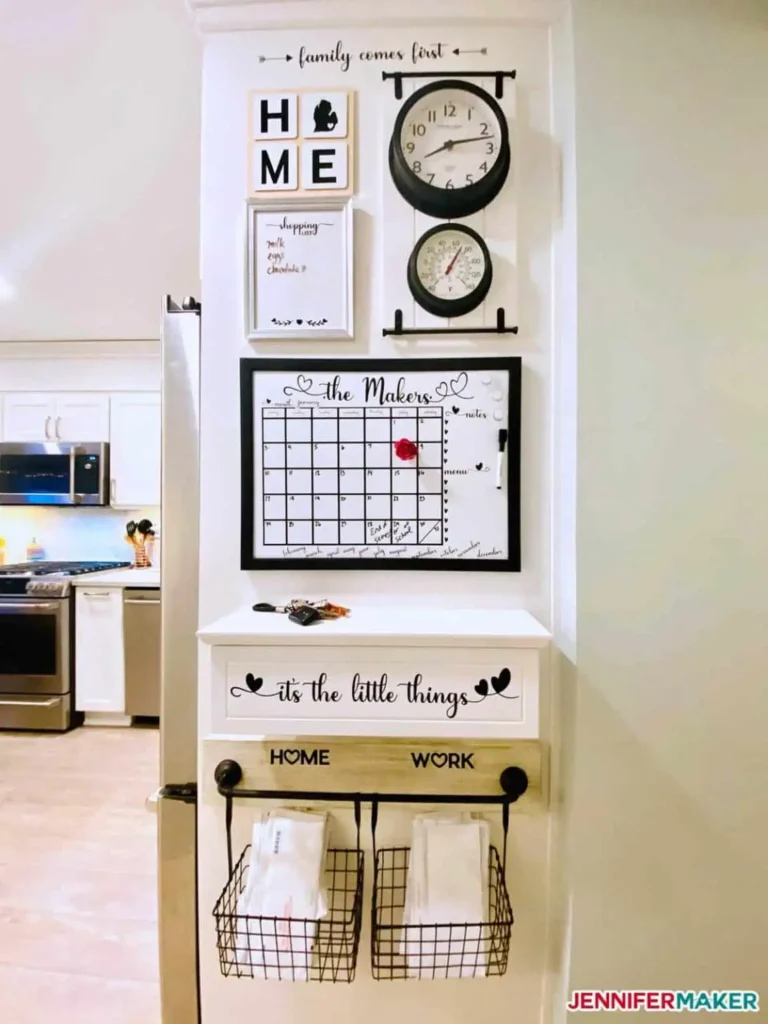
The simplest command center is often the most effective. Mount a large wall calendar in your kitchen—somewhere you pass multiple times daily.
What You Need
- One large wall calendar (at least 24″ x 36″)
- Mounting hardware or command strips
- Colored markers or pens (one color per family member)
- Small basket or magnetic container for pens
- Optional: small cork board beside calendar for papers
How to Set It Up
- Choose a wall space in the kitchen with good visibility (avoid behind doors or in corners)
- Mount the calendar at adult eye level
- Assign each family member a color (Mom = blue, Dad = green, Kids = red/purple)
- Write all activities, appointments, and commitments on the calendar in the appropriate color
- Add a basket underneath for pens and current papers
Why It Works
No learning curve. Everyone understands calendars. There’s no app to download, no system to explain—just write the activity on the correct date.
Immediate visibility. Walk into the kitchen and you see this week’s schedule. No opening apps or clicking through screens.
Minimal maintenance. Update it once when you book something. That’s it.
Pro Tips
- Write recurring activities (soccer practice, piano lessons) for the entire month at once
- Add a small “notes” section at the bottom for quick reminders
- Take a photo of the month at the beginning—if papers get destroyed, you have a backup
2. The Mudroom Station
Best for: Families with a dedicated entry space
Transform your mudroom into a complete command center that captures everything the moment you walk in the door.
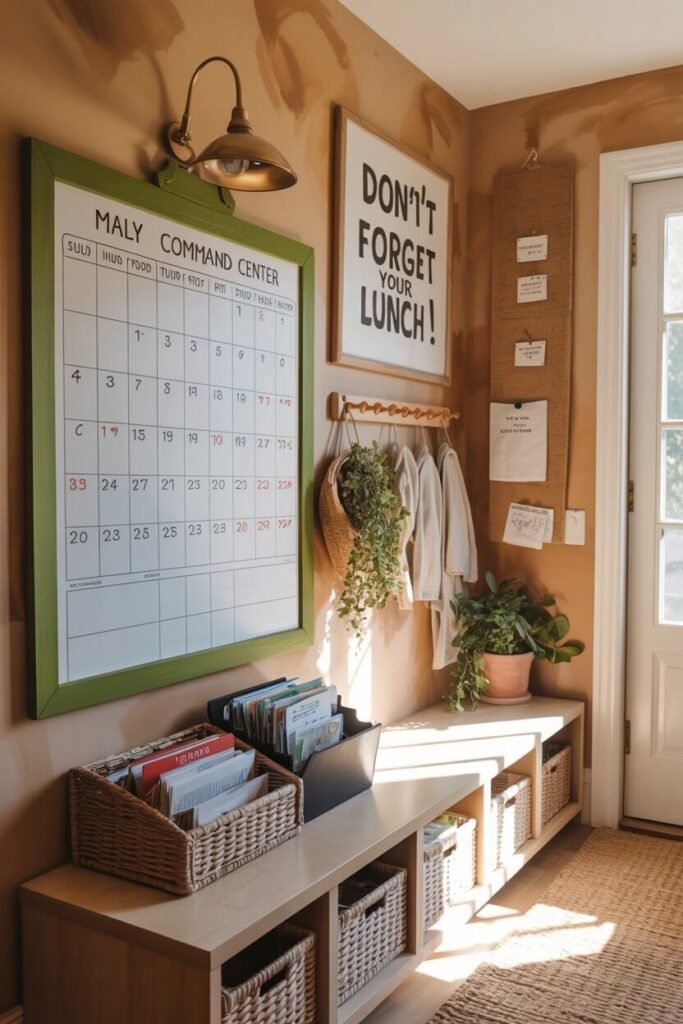
What You Need
- Wall-mounted coat hooks (one per family member)
- Cubbies or bins below hooks (for shoes and bags)
- Small wall-mounted organizer with slots (for mail and papers)
- Whiteboard or chalkboard (for messages and quick lists)
- Key hooks or small basket
How to Set It Up
- Install coat hooks at varying heights so kids can reach theirs
- Place labeled cubbies or bins below each hook (one per person)
- Mount the paper organizer beside the hooks (label slots: “To File,” “To Pay,” “School Papers,” “To Sign”)
- Add whiteboard on available wall space
- Install key hooks at adult height or place a small catchall basket on a shelf
Why It Works
It intercepts chaos at the door. Instead of coats on chairs, papers on counters, and keys lost in bags, everything has an immediate home.
Daily habits happen automatically. Kids learn their routine: hang coat, drop bag in cubby, put papers in correct slot.
Visual accountability. When the “To Sign” slot is full, you know forms need attention.
Pro Tips
- Label everything with names and pictures for young kids
- Add a small trash can for junk mail—sort it immediately
- Include a shoe mat underneath to contain dirt and mud
3. The Kitchen Cabinet Command Center
Best for: Small spaces or renters who can’t mount wall items
Turn the inside of a kitchen cabinet door into a hidden command center.
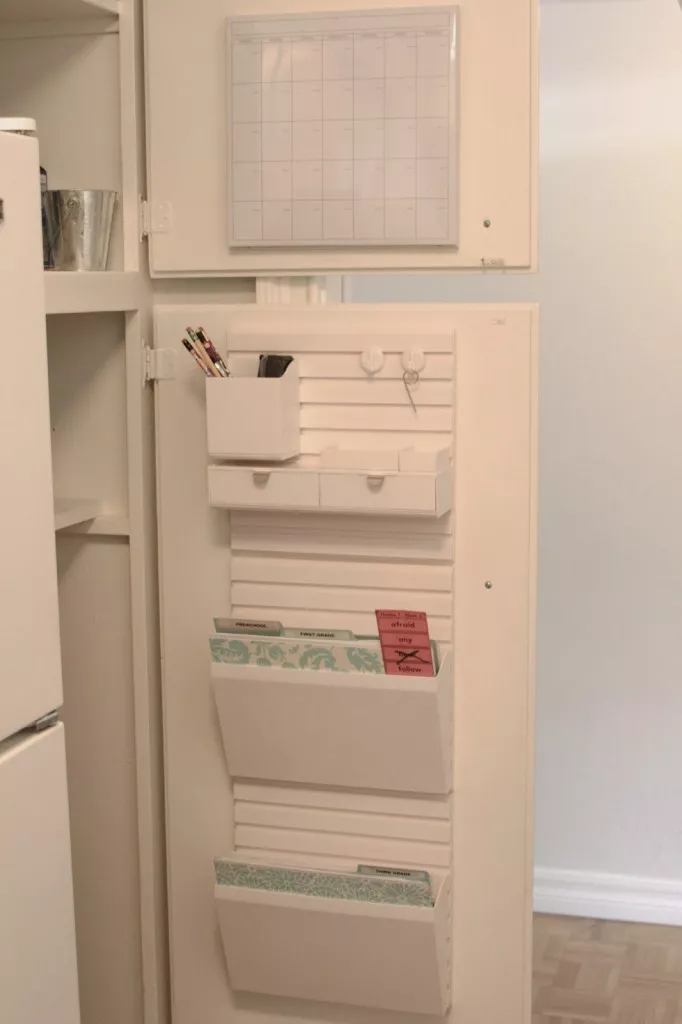
What You Need
- Over-the-door organizer OR adhesive pockets/baskets
- Small magnetic whiteboard or laminated calendar
- Command hooks
- Clips or binder clips
- Small basket for pens/markers
How to Set It Up
- Choose a cabinet door you open frequently (near coffee maker or dishes works well)
- Attach adhesive pockets or an over-the-door organizer to the inside of the door
- Mount small whiteboard or attach laminated monthly calendar with command strips
- Add hooks for keys
- Create slots: “This Week,” “To Do,” “Pending,” “File”
Why It Works
Hidden mess. Your command center is functional but invisible to guests. Close the cabinet door and everything disappears.
Rental-friendly. No permanent holes or damage. Remove everything when you move.
Forces daily interaction. Since you open this cabinet regularly anyway, you’ll see and update the command center naturally.
Pro Tips
- Use clear pocket organizers so you can see contents without opening
- Add a small “urgent” pocket at eye level for time-sensitive items
- Include a pen on a string so it never disappears
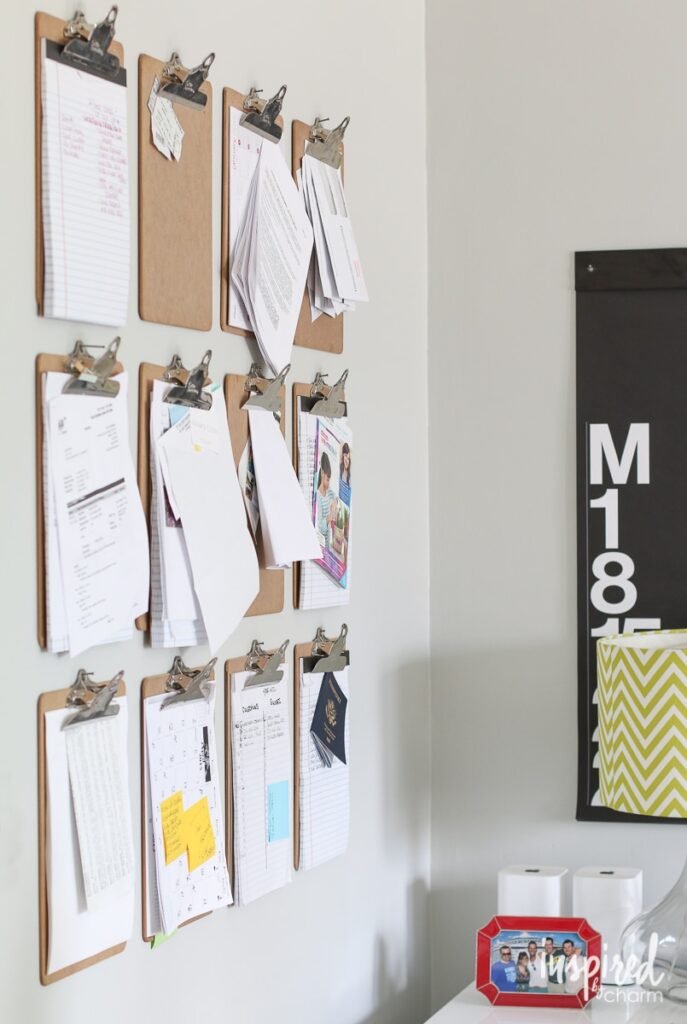
4. The Clipboard Wall
Best for: Visual families who need to see everything at once
Create a gallery wall of clipboards, each serving a different function in your family’s organization.
What You Need
- 5-7 clipboards in matching or coordinating styles
- Wall hooks or nails
- Printed calendars, meal plans, chore charts, contact lists
- Markers or pens in a nearby container
How to Set It Up
- Arrange clipboards on a wall in a grid or gallery pattern
- Label each clipboard’s purpose at the top
- Assign clipboards: “Family Calendar,” “This Week’s Meals,” “Kids’ Activities,” “Mom’s To-Do,” “Dad’s To-Do,” “Important Contacts,” “Chores”
- Clip relevant papers or printed sheets to each board
- Mount a small basket nearby for writing tools
Why It Works
Ultimate flexibility. Change what’s on any clipboard instantly. Swap out chore charts, update meal plans, or add new categories without redoing the entire system.
Individual accountability. Each person can have their own clipboard for their schedule or responsibilities.
Easy updates. Just clip new papers on top or write directly on papers.
Pro Tips
- Use decorative clipboards that match your decor—this doubles as wall art
- Print monthly calendars from free templates online and clip one to each clipboard
- Add a “completed” clipboard where kids move finished chore charts for a sense of accomplishment
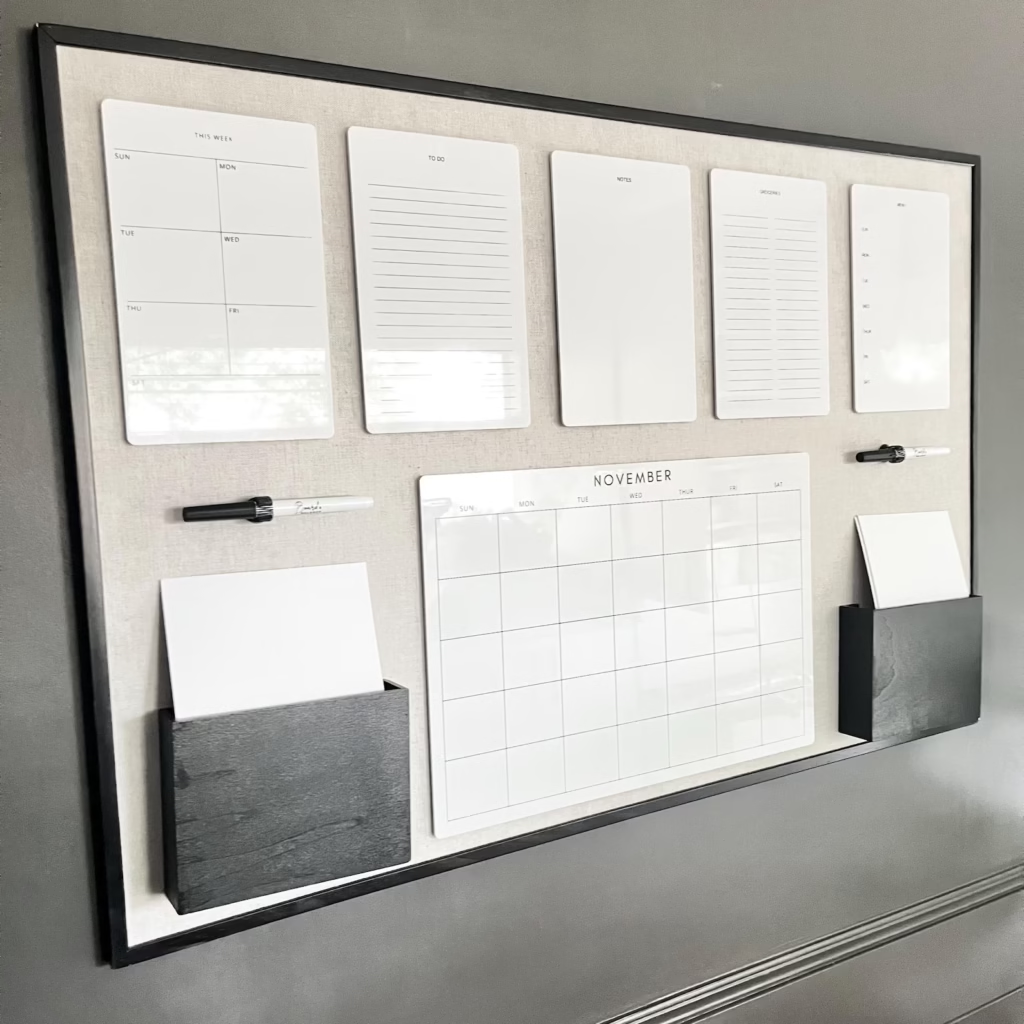
5. The Magnetic Board Hub
Best for: Families who like moving pieces around and visual flexibility
A large magnetic board becomes an interactive command center where schedules and papers can be rearranged easily.
What You Need
- Large magnetic whiteboard or magnetic chalkboard
- Strong magnets in various sizes
- Magnetic pockets or envelopes
- Dry erase markers or chalk
- Optional: magnetic calendar overlay
How to Set It Up
- Mount board on a main wall (kitchen or hallway)
- Divide board into sections using tape or drawn lines: “This Week,” “Next Week,” “Important,” “To Pay”
- Add magnetic pockets for papers and envelopes
- Use magnets to hold current papers, photos, or reminders
- Write directly on board for urgent messages or quick notes
Why It Works
Highly visual. You see everything at a glance—no opening folders or flipping through papers.
Easy reorganization. Move magnets and papers around as priorities shift. Nothing is permanent.
Kid-friendly. Children can move their own activity sheets or artwork magnets, giving them ownership of the system.
Pro Tips
- Use different colored magnets for different family members
- Create a “done” section where completed tasks move before being filed
- Add magnetic photo frames for monthly calendar pages you can swap out
6. The Binder Command Center
Best for: Families who want a portable system or have limited wall space
Keep your entire command center in a centralized binder that lives in one kitchen spot.

What You Need
- 2-3 inch three-ring binder
- Divider tabs
- Sheet protectors
- Pen/pencil pouch that clips into binder
- Optional: dry-erase pockets for reusable pages
How to Set It Up
- Create sections with tabs: “Calendar,” “Meal Plans,” “Contacts,” “School Info,” “Medical,” “To-Do,” “Bills”
- Print monthly calendars and insert in “Calendar” section
- Use dry-erase pockets for frequently changing info (this week’s meals, current to-do list)
- Keep important papers in sheet protectors (emergency contacts, insurance cards, school schedules)
- Store binder on counter in designated spot—always return it there
Why It Works
Complete portability. Take the entire command center to doctor’s appointments, school meetings, or while traveling.
Protected documents. Sheet protectors keep important papers from getting ruined by spills or sticky hands.
Contained system. Nothing gets lost because everything lives in one binder.
Pro Tips
- Use a binder with a clear cover pocket—insert a “family command center” label
- Add a pen loop so writing tools never disappear
- Include a small zipper pouch for gift cards, stamps, or small items that usually get lost
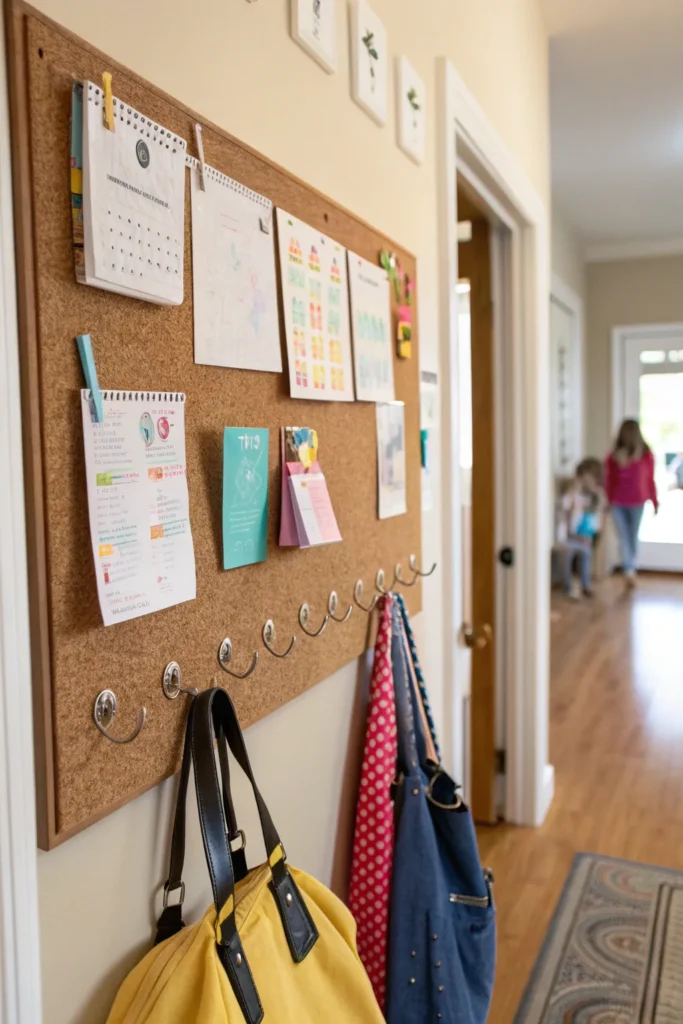
7. The DIY Cork Board Grid
Best for: Visual planners who like pinning everything
Create a large cork board divided into functional sections for different aspects of family life.
What You Need
- Large cork board (at least 24″ x 36″) or multiple smaller boards arranged together
- Washi tape or ribbon to create grid sections
- Push pins in multiple colors
- Small envelopes pinned to board for papers
- Labels for each section
How to Set It Up
- Mount cork board on wall
- Use washi tape to divide board into 6-9 sections
- Label sections: “This Week,” “Mom,” “Dad,” “Kids,” “Menu,” “Bills Due,” “Don’t Forget,” “Shopping”
- Pin papers, notes, receipts, and reminders in appropriate sections
- Use colored pins to indicate priority (red = urgent, yellow = soon, green = when possible)
Why It Works
Completely customizable. Change sections as family needs evolve. Add more categories or remove ones you don’t use.
Tactile and satisfying. There’s something about physically pinning items that helps you remember them better than digital methods.
Nothing hidden. Every paper and reminder is visible, so nothing falls through the cracks.
Pro Tips
- Use clear push-pin style name badge holders to create reusable label spots
- Pin small envelopes for tiny papers (receipts, appointment cards)
- Take a photo of the board before clearing it at month-end—creates a record
8. The Digital-Physical Hybrid
Best for: Tech-comfortable families who want the best of both worlds
Combine a shared digital calendar with a physical command center for papers and quick reference.
What You Need
- Shared digital calendar (Google Calendar, Cozi, Apple Calendar)
- Small wall-mounted organizer for papers (3-5 slots)
- Printed monthly view of digital calendar
- Tablet or old smartphone mounted on wall (optional)
- Physical inbox for papers
How to Set It Up
- Create shared family calendar in your preferred app—add all family members
- Assign each person a color
- Print a monthly view each month and display it prominently (or mount tablet showing live calendar)
- Add physical organizer below for papers that need action
- Train family members: digital calendar for schedules, physical center for paperwork
Why It Works
Accessible anywhere. Parents and older kids can check and update the calendar from their phones even when not home.
Automatic reminders. Digital calendars send notifications so you don’t forget appointments.
Handles papers too. The physical component processes the mail, school forms, and bills that still arrive on paper.
Pro Tips
- Use a calendar app that allows photo attachments—snap pictures of paper schedules instead of keeping the physical copy
- Set up email-to-calendar functions so school emails automatically add to family calendar
- Print the month view on Sundays and update it—keeps digital and physical in sync
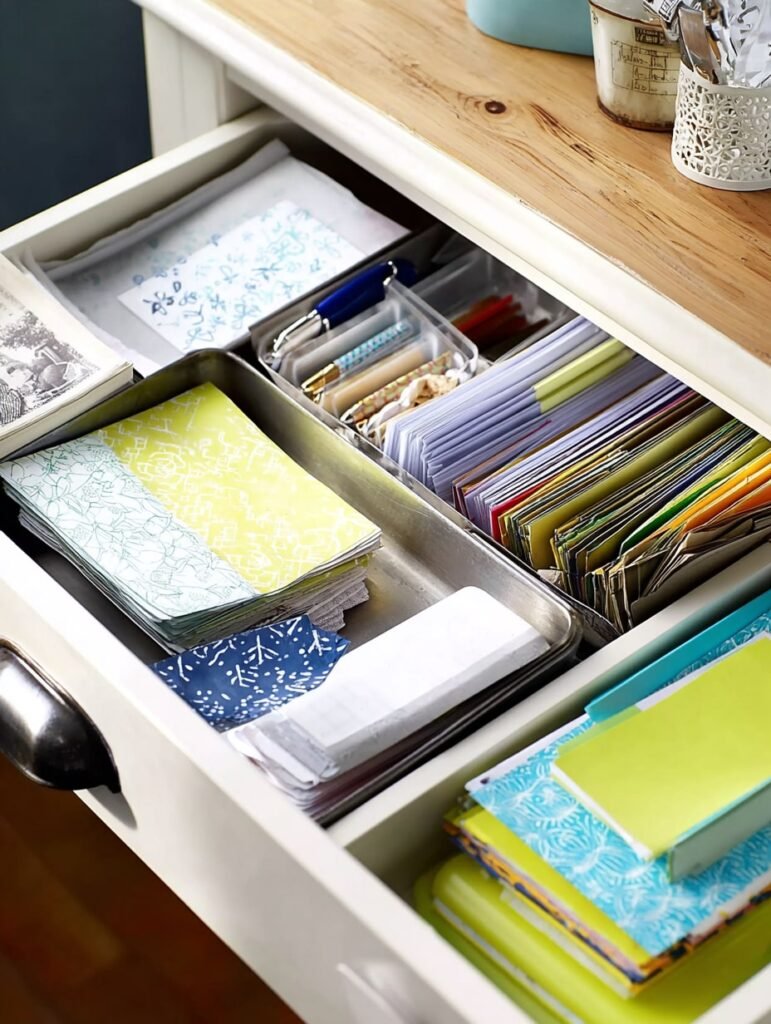
9. The Shallow Drawer Station
Best for: Families with available drawer space near the kitchen
Convert a kitchen or hallway drawer into a command center filing system.
What You Need
- Drawer organizer with multiple compartments
- File folders (standing or hanging, depending on drawer depth)
- Labels for categories
- Small notepads
- Pens/pencils
How to Set It Up
- Clear out one easily accessible drawer
- Install drawer organizer dividers
- Create file categories: “To Pay,” “To File,” “School – Current,” “Medical,” “To Do”
- Add small compartments for pens, stamps, paper clips
- Keep a notepad clipped inside drawer lid for quick notes
Why It Works
Out of sight but organized. Your command center doesn’t take up wall space or create visual clutter.
Forces processing. When the drawer gets full, you must deal with papers—prevents overwhelming paper piles.
Protected from damage. Papers in a drawer don’t get splattered with food or torn by curious toddlers.
Pro Tips
- Add a “completed” folder at the back for recently handled items—gives you a buffer before final filing
- Use color-coded folders for easy identification at a glance
- Include a small trash bag in the back for immediate junk mail disposal
10. The Rotating Binder System
Best for: Families with multiple kids in different activities
Create individual binders for each family member plus a master family binder, and rotate the current one to the front.
What You Need
- One binder per family member + one master binder
- Binder labels
- Sheet protectors
- Divider tabs
- Binder shelf or basket
How to Set It Up
- Create a master family binder: calendar, contacts, household info
- Create individual binders for each family member containing their schedules, school papers, medical records, activity information
- Store binders in accessible location
- Rotate: pull out relevant binders for the week (soccer season = Emma’s binder to the front)
- Master binder always accessible
Why It Works
Reduces overwhelm. Instead of one massive command center with everyone’s information jumbled, each person’s details are self-contained.
Grows with kids. As children age, they can manage their own binders and take ownership of their schedules and responsibilities.
Easy information access. Need medical records for the doctor? Grab that child’s binder. School meeting? That binder comes with you.
Pro Tips
- Use different colored binders for each family member (matches calendar color coding)
- Include a clear pocket on binder cover for current week’s schedule
- Add zipper pouches inside binders for permission slips, lunch money, etc.
11. The Tiered Tray Tower
Best for: Small spaces or families who prefer contained systems
Use a decorative tiered tray (like the farmhouse style ones) as a vertical command center.
What You Need
- Three-tiered standing tray or organizer
- Small baskets or containers that fit tray levels
- Mini clipboard or notepads
- Labels for each tier/basket
- Pens in a small cup
How to Set It Up
- Place tiered tray in kitchen or entry area
- Assign each tier a function:
- Top tier: Current week (calendar, meal plan, urgent notes)
- Middle tier: Paperwork (inbox, to-file, to-pay)
- Bottom tier: Supplies (pens, stamps, notepads, keys)
- Use small baskets within tiers to separate categories
- Label everything clearly
Why It Works
Decorative and functional. These trays look intentional and stylish, not cluttered.
Vertical space usage. Takes up minimal counter footprint while maximizing storage.
Portable. Move the entire command center if you need the counter space for meal prep.
Pro Tips
- Choose trays with high edges to prevent papers sliding off
- Use washi tape to section the tiers if needed
- Rotate seasonal items on top tier (holiday cards, summer camp info)
12. The Entryway Console Table Setup
Best for: Families with entryway space and moderate paperwork
Turn a console table by your front door into a stylish command center.
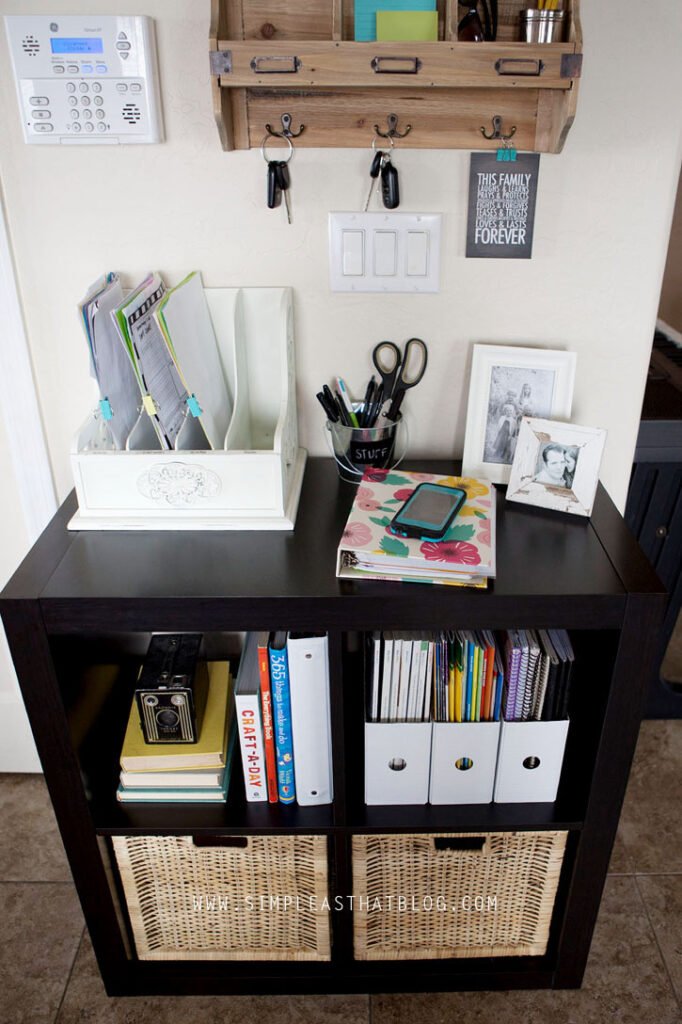
What You Need
- Console table or narrow sofa table
- Wall-mounted calendar above table
- Baskets or bins underneath table (one per family member)
- Decorative trays or boxes on table surface
- Mail sorter or standing file organizer
- Small lamp or lighting
How to Set It Up
- Place console table near entryway
- Mount large wall calendar directly above table
- Place mail sorter on one end of table, decorative catchall tray on other end
- Add labeled baskets underneath for each family member’s items (bags, shoes, papers)
- Keep writing tools in a decorative cup on table surface
Why It Works
First-stop organization. As soon as you enter the house, you interact with the command center—dropping mail, checking calendar, hanging keys.
Storage below, function above. Table surface handles daily items while baskets below hide bags, shoes, and less attractive necessities.
Looks intentional. This setup looks like furniture, not an organizational system, so it elevates your home’s appearance.
Pro Tips
- Add a small tray labeled “outgoing” for items that need to leave the house (library books, returns, bills to mail)
- Use pretty boxes on the table surface to hide less attractive organizational tools
- Install a narrow shelf above the calendar for extra storage without visual clutter
13. The Pocket Chart System
Best for: Families with young children or heavy paper flow
Use a hanging pocket chart (the kind used in classrooms) as your command center.
What You Need
- Large pocket chart (over-the-door or wall-mounted)
- Labels for each pocket
- Clear pockets if possible (so contents are visible)
- Small clips
- Nearby basket for writing supplies
How to Set It Up
- Hang pocket chart in kitchen or main hallway
- Label pockets by category: “This Week’s Menu,” “Monday,” “Tuesday,” “Wednesday,” etc., “Bills,” “School Papers,” “To File”
- Place relevant papers in appropriate pockets each day
- Add a row at bottom for each family member’s personal papers
- Clear out pockets weekly—process papers and start fresh
Why It Works
Kid-friendly design. Children understand the pocket system easily and can put their own papers in designated spots.
Daily sorting. When you assign pockets by day of the week, you process papers on a daily schedule instead of letting them accumulate.
Clear visibility. You see exactly what needs attention each day without shuffling through piles.
Pro Tips
- Use different colored labels for different family members
- Add a “done” pocket at the bottom for papers that have been handled but not yet filed
- Include pockets for meal plans and grocery lists so they’re visible all week
14. The Minimalist Wall Grid
Best for: Families who want clean aesthetics with maximum function
Create a wire grid or pegboard command center with minimal visual clutter.
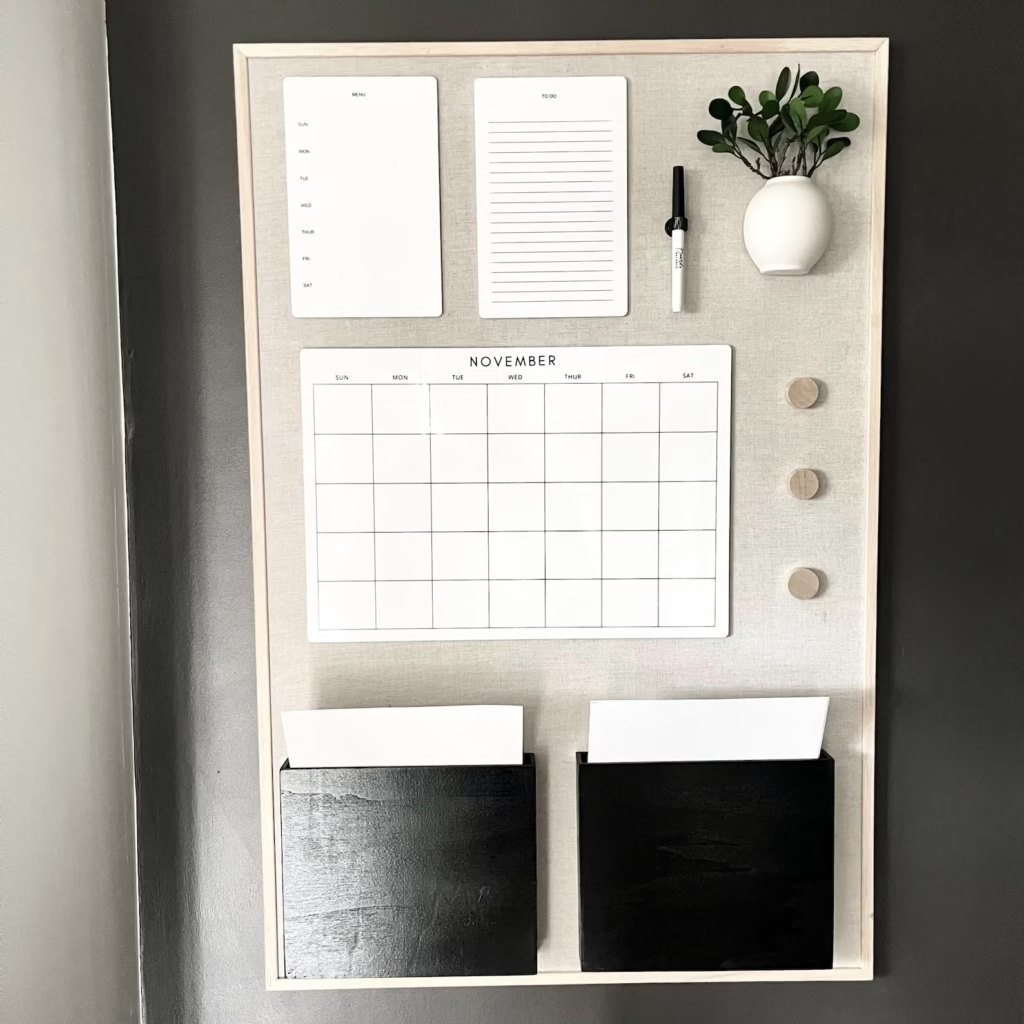
What You Need
- Metal wire grid panel (or pegboard)
- S-hooks, clips, and baskets that hook onto grid
- Small chalkboard or whiteboard that hangs from grid
- Hanging file folders with hooks
- Hooks for keys and bags
How to Set It Up
- Mount wire grid panel on wall (kitchen or mudroom ideal)
- Attach small whiteboard or chalkboard with S-hooks for calendar/notes
- Hang file baskets for papers (label: “Inbox,” “To Do,” “File”)
- Add hooks for keys, headphones, masks, or bags
- Clip current papers or reminders directly to grid with binder clips
Why It Works
Infinitely adaptable. Move hooks and attachments anywhere on the grid as needs change. Reconfigure in seconds.
Modern aesthetic. Wire grids look intentional and contemporary, not cluttered or childish.
See-through design. Grid doesn’t block wall color or create visual heaviness—perfect for small spaces.
Pro Tips
- Spray paint grid to match your decor (matte black, white, or gold are popular)
- Add small plants in hanging containers for a decorative touch
- Use binder clips with paper labels instead of permanent markers—easier to change
15. The Family Bulletin Board + Shelf Combo
Best for: Families who need significant paper storage plus display space
Combine a bulletin board with a floating shelf above or below for maximum functionality.
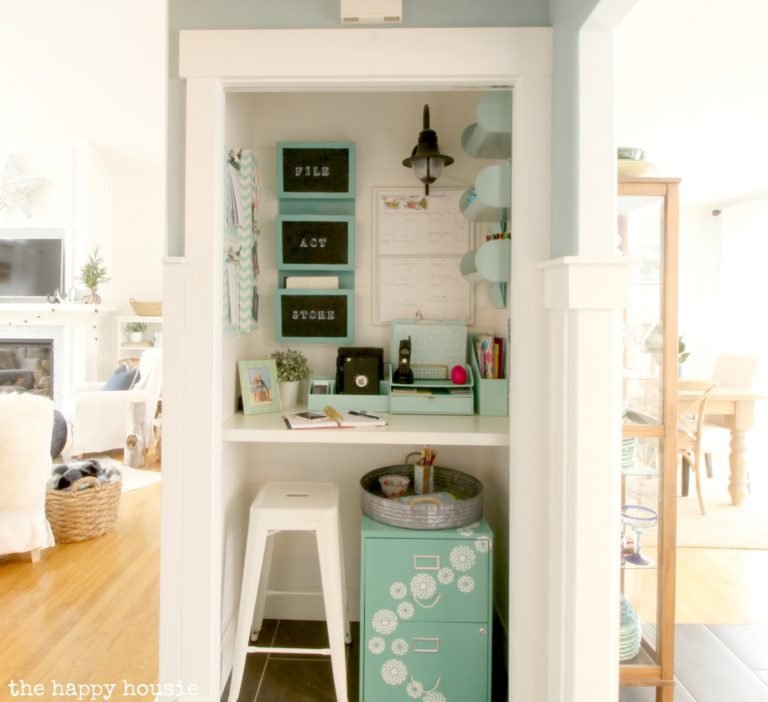
What You Need
- Large cork board or fabric bulletin board
- Floating shelf (installed above or below board)
- Push pins or decorative pins
- Small baskets or boxes for shelf
- Calendar or paper organizers
How to Set It Up
- Install floating shelf at eye level
- Mount bulletin board directly above or below shelf
- Use shelf for: mail sorter, pens/supplies, weekly papers, decorative elements
- Use bulletin board for: current calendar page, important reminders, kids’ artwork, inspiration
- Section board with washi tape if desired
Why It Works
Combines function and memory keeping. Pin both functional papers (schedules, lists) and sentimental items (kids’ drawings, photos, achievements).
Additional storage. Shelf holds items that can’t be pinned plus everyday essentials.
Vertical efficiency. Uses wall space completely without requiring a large furniture footprint.
Pro Tips
- Rotate kids’ artwork monthly—take photos before unpinning to preserve memories digitally
- Keep “urgent” items in the center of the board at eye level
- Use shelf baskets to hold papers by category (school, bills, medical)
Choosing the Right Command Center for Your Family
With 15 options, you might be wondering: which one is actually right for us?
Ask These Questions
How much wall space do we have?
Limited space → Cabinet, drawer, tiered tray, or binder system
Moderate space → Magnetic board, cork board, clipboard wall
Ample space → Mudroom station, console table, bulletin board + shelf
How much paper do we handle?
Light paper flow → Simple wall calendar or clipboard system
Moderate paper flow → Pocket chart, binder, or hybrid system
Heavy paper flow → Mudroom station, rotating binders, or drawer system
What’s our family’s style?
Visual/hands-on → Cork board, magnetic board, pocket chart
Tech-savvy → Digital-physical hybrid
Minimalist → Wire grid, drawer system, cabinet center
Traditional → Calendar, console table, bulletin board
Who will use this?
Just adults → Any system works
Young children → Pocket chart, mudroom cubbies, magnetic board (easy to see and reach)
Teens → Clipboard wall, rotating binders (individual ownership)
Start Simple, Build Later
Here’s the truth: The best family command center is the one you’ll actually use consistently.
Don’t overcomplicate this. Start with the simplest version that addresses your biggest pain point:
- Losing papers? → Start with a mail sorter
- Forgetting appointments? → Start with a wall calendar
- Morning chaos? → Start with a mudroom station
You can always add components later. A simple system you maintain beats an elaborate setup you abandon after two weeks.
Making Your Command Center Sustainable
The biggest mistake families make is creating a command center and then… not maintaining it.
The Weekly Reset (10 Minutes)
Every Sunday evening or Monday morning, spend 10 minutes:
- Clear out “done” items (file or trash completed papers)
- Update the calendar (add new appointments from phones/emails)
- Review this week’s needs (permission slips to sign, bills to pay)
- Restock supplies (pens, paper, stamps)
- Adjust as needed (move things that aren’t working)
Get Buy-In From Family Members
Your command center fails if you’re the only one using it. Create ownership:
For young kids: Let them choose their color or decorate their cubby label. Make it fun to check the calendar or put papers in the right spot.
For older kids: Give them responsibility for their own section. They manage their schedule, papers, and activities.
For partners: Divide the command center tasks. One person handles bills, the other handles school papers. Both check and update the calendar.
When to Reevaluate
Your family changes. Your command center should too. Reassess every 6 months:
- Is this still working for our schedule?
- Are there new needs we should add?
- What can we simplify or remove?
- Does the physical location still make sense?
Life stages matter. The command center that worked when kids were in elementary school needs adjustment when they hit middle school. A system perfect for one child might not scale to three. Stay flexible.
Your Command Center Starts Today
Let’s bring this home. You now have 15 proven home organization ideas for creating a family command center that actually functions in real life.
You’ve seen options for every space size, every budget, and every family style. You understand what makes command centers work versus fail. And you know how to maintain the system once it’s built.
The next step is action.
Choose one idea from this list—the one that resonated most with your family’s needs and your available space. Don’t try to combine three ideas or build the “perfect” system. Pick one. Start there.
This week, invest 30 minutes setting up your command center. It doesn’t have to be pretty yet. It just has to work.
Next week, use it every day. Add papers. Check the calendar. Make it a habit.
The week after, you’ll wonder how you ever functioned without it.
That’s when you’ll know your family’s command center isn’t just an organization project—it’s the system that finally brought order to your household.
Get Your Free Command Center Checklist
Ready to build your command center but not sure where to start?
I’ve created a free printable checklist that walks you through every step:
✓ Supplies you need for your chosen system
✓ Setup steps in order
✓ Weekly maintenance tasks
✓ Troubleshooting guide for common problems
✓ Customization ideas for different family sizes
Download your free command center checklist now and transform your family’s organization in one weekend.
Your days of lost papers, forgotten appointments, and morning chaos are over. Your family command center starts today.
Ready to finally get organized? Download the free command center checklist and create a system that actually works for your busy family.
Sign up!
Stay up to date on the latest tips in balancing your mom life